
Test and Analyze Model Robustness with NRTK and XAITK for the Image Classification Task#
Overview#
This guide demonstrates how to integrate the Natural Robustness Toolkit (NRTK) with XAITK-Saliency to assess model robustness and understand why models fail in image classification tasks. Unlike traditional robustness testing, which only measures performance degradation, this approach reveals how the features your model focuses on change under perturbation, allowing you to interpret and act on the results as they are generated.
This notebook is created from Explaining model robustness: combining saliency maps and natural robustness testing using XAITK and NRTK.
What You’ll Accomplish#
Apply systematic perturbations and generate interpretable saliency maps.
Recognize robust vs. sensitive model behaviors as you test.
Quantify saliency changes and understand what they indicate.
Make informed decisions about model deployment and improvement.
Table of Contents#
Set Up the Environment#
import sys

%pip install -qU pip
print("Install huggingface transformers and datasets")
%pip install -q transformers datasets
print("Installing ultralytics...")
%pip install -q ultralytics
print("Installing tabulate...")
%pip install -q tabulate
print("Installing xaitk_jatic...")
%pip install -q xaitk-jatic
print("Installing nrtk with optional dependencies...")
try:
    import cv2  # noqa: F401 -- intentionally unused, just checking availability
    import maite  # noqa: F401 -- intentionally unused, just checking availability
    import PIL  # noqa: F401 -- intentionally unused, just checking availability
    import pybsm  # noqa: F401 -- intentionally unused, just checking availability
    import skimage  # noqa: F401 -- intentionally unused, just checking availability

    import nrtk  # noqa: F401 -- intentionally unused, just checking availability
except ImportError:
    %pip install -q "nrtk[pybsm,maite,tools,skimage,headless,pillow]"
print("Installing headless OpenCV...")
%pip uninstall -qy opencv-python opencv-python-headless
%pip install -q opencv-python-headless
from __future__ import annotations  # noqa: F404

# Python imports
import os
import random
import warnings
from pathlib import Path

# 3rd party imports
import matplotlib.pyplot as plt
import numpy as np
import torch

# Setting seed for reproducibility
seed = 123
os.environ["PYTHONHASHSEED"] = str(seed)
random.seed(seed)
np.random.default_rng(seed)
torch.manual_seed(seed)

warnings.filterwarnings("ignore")

%matplotlib inline
%config InlineBackend.figure_format = "jpeg"  # Use JPEG format for inline visualizations

# Add notebook utils to path
notebook_dir = Path().absolute()
utils_path = notebook_dir / "utils"
if str(utils_path) not in sys.path:
    sys.path.insert(0, str(utils_path))
Define Model and Dataset#
The NRTK-XAITK workflow depends on HuggingFace (HF) to download the required dataset/model. To align the dataset/model to the Image Classification evaluation workflow, we need to adapt the HF dataset/model to be compliant with MAITE protocols.
In the section below, we define the HuggingFace-MAITE adapters for the EuroSAT dataset and HF pretrained-model for the Image Classification task.
from image_classification.dataset import (
    HuggingFaceMaiteDataset,
    create_data_subset,
)
from image_classification.model import HuggingFaceMaiteModel

# Check if CUDA is available and set the device accordingly
CUDA_AVAILABLE = torch.cuda.is_available()
device = "cuda" if CUDA_AVAILABLE else "cpu"

hf_dataset_name = "cm93/eurosat"  # Hugging Face dataset name
test_set_fraction = 0.01  # Fraction of the test set to use for the subset
example_img_id = 0  # Example image index

# Create a subset of the EuroSAT dataset
hf_dataset = create_data_subset(
    dataset_name=hf_dataset_name,
    split="test",
    fraction=test_set_fraction,
)
# Print dataset information
print(f"Dataset name: {hf_dataset_name}")
print(f"Number of samples: {len(hf_dataset)}")
categories = hf_dataset.features["label"].names
print(f"Dataset categories: {categories}")

# Create a HuggingFaceMaiteDataset instance
# This will wrap the Hugging Face dataset to comply with the MAITE Dataset protocol
maite_dataset = HuggingFaceMaiteDataset(hf_dataset=hf_dataset, dataset_name=hf_dataset_name)
print(f"Number of classes: {maite_dataset.num_classes}")

# Create a HuggingFaceMaiteModel instance
# This will wrap a Hugging Face model to comply with the MAITE Image Classification protocol
maite_classifier = HuggingFaceMaiteModel(
    model_name="nielsr/convnext-tiny-224-finetuned-eurosat-albumentations",
    device=device,
)
Dataset name: cm93/eurosat
Number of samples: 27
Dataset categories: ['Forest', 'River', 'Highway', 'AnnualCrop', 'SeaLake', 'HerbaceousVegetation', 'Industrial', 'Residential', 'PermanentCrop', 'Pasture']
Number of classes: 10
Using a slow image processor as `use_fast` is unset and a slow processor was saved with this model. `use_fast=True` will be the default behavior in v4.52, even if the model was saved with a slow processor. This will result in minor differences in outputs. You'll still be able to use a slow processor with `use_fast=False`.
Configure Your NRTK Perturbation Strategy#
Gaussian Blur Perturbation#
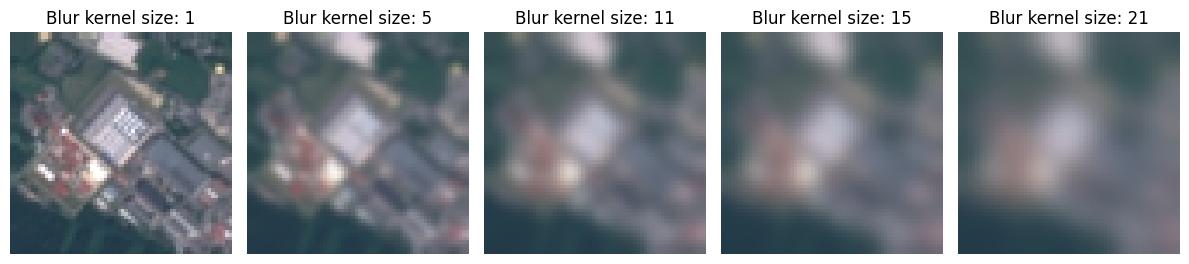
To perturb the input dataset with the Gaussian Blur operation, we set up a sequence of perturber configurations using the GaussianBlurPerturber that ranges across five blur kernel sizes (ksize). Each perturber configuration is applied to the entire dataset to create five new perturbed datasets. To understand each perturber’s setting, we visualize a sample image from each dataset.
from nrtk.impls.perturb_image.photometric.blur import GaussianBlurPerturber

# Parameters for Gaussian blur perturbation sweep
SWEEP_LOW = 1  # minimum kernel size
SWEEP_HIGH = 20  # maximum kernel size
SWEEP_COUNT = 5  # number of values to sample

# Generate list of odd kernel sizes for Gaussian blur
blur_perturbation_values = np.floor(
    np.linspace(
        SWEEP_LOW,
        SWEEP_HIGH,
        SWEEP_COUNT,
        endpoint=True,
    ),
).astype(int)
# Gaussian blur requires odd kernel sizes to maintain
# symmetric padding along the edges to preserve dimensionality.
blur_perturbation_values = [p if p % 2 == 1 else p + 1 for p in blur_perturbation_values]
blur_augmentations = [GaussianBlurPerturber(ksize=p) for p in blur_perturbation_values]

# Visualize the perturbations on a sample image
img = np.asarray(hf_dataset[example_img_id]["image"])

_, ax = plt.subplots(1, 5, figsize=(12, 6))
for idx, p in enumerate(blur_perturbation_values):
    ax[idx].set_title(f"Blur kernel size: {p}")
    ax[idx].imshow(blur_augmentations[idx](image=img)[0])
    _ = ax[idx].axis("off")
plt.tight_layout()
Salt Noise Perturbation#
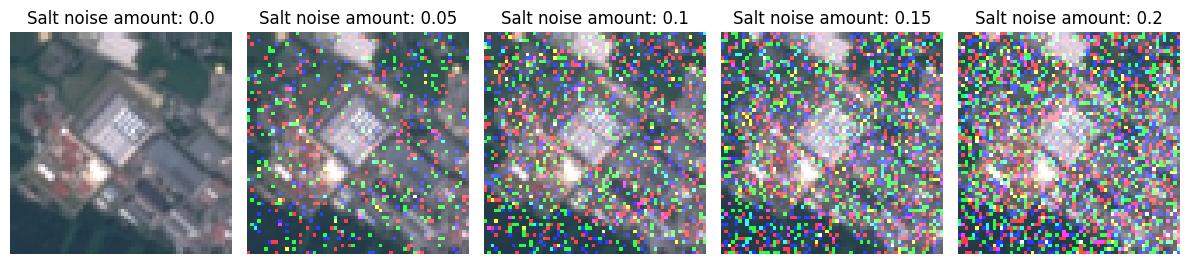
To apply salt noise to the input dataset, we set up a sequence of perturber configurations using the SaltNoisePerturber that ranges across five salt noise amount values. Each perturber configuration is applied on the entire dataset to create five new perturbed datasets. To understand each perturber’s setting, we visualize a sample image from each dataset.
from nrtk.impls.perturb_image.photometric.noise import SaltNoisePerturber

# Parameters for salt noise perturbation sweep
SWEEP_LOW = 0.0  # minimum salt noise amount
SWEEP_HIGH = 0.20  # maximum salt noise amount
SWEEP_COUNT = 5  # number of values to sample

# Generate augmentations using salt noise with increasing intensity
noise_perturbation_values = np.round(
    np.linspace(
        SWEEP_LOW,
        SWEEP_HIGH,
        SWEEP_COUNT,
        endpoint=True,
    ).astype(float),
    decimals=2,
)
salt_augmentations = [SaltNoisePerturber(amount=s) for s in noise_perturbation_values]

# Visualize the perturbations on a sample image
img = np.asarray(hf_dataset[example_img_id]["image"])

_, ax = plt.subplots(1, 5, figsize=(12, 6))
for idx, s in enumerate(noise_perturbation_values):
    ax[idx].set_title(f"Salt noise amount: {s}")
    ax[idx].imshow(salt_augmentations[idx](image=img)[0])
    _ = ax[idx].axis("off")
plt.tight_layout()
Evaluate Perturbed Datasets#
Compute Accuracy Metric#
For understanding the overall impact of the two different perturbers on model performance, we compute the model’s prediction accuracy across the various perturbed datasets. For this computation, we use a MAITE-compliant accuracy metric and evaluation workflow. To adapt the perturber configurations within this workflow, we use NRTK’s MAITEImageClassificationAugmentation wrapper.
import torchmetrics.classification
from maite.interop.metrics.torchmetrics import TMClassificationMetric
from maite.tasks import evaluate

from nrtk.interop import MAITEImageClassificationAugmentation

# Initialize accuracy metric (Maite-compatible)
classification_metric = torchmetrics.classification.MulticlassAccuracy(maite_dataset.num_classes)
maite_acc_metric = TMClassificationMetric(classification_metric)

# List to store results for Gaussian blur perturbation
gauss_blur_perturbed_metrics = []
for idx, aug in enumerate(blur_augmentations):
    # Create a MAITEImageClassificationAugmentation instance for each perturbation
    maite_aug = MAITEImageClassificationAugmentation(augment=aug, augment_id=f"GaussianBlurPerturber_{idx}")
    # reset the metric object for each dataset
    maite_acc_metric.reset()
    result, _, _ = evaluate(
        model=maite_classifier,
        metric=maite_acc_metric,
        dataset=maite_dataset,
        augmentation=maite_aug,
    )
    gauss_blur_perturbed_metrics.append(result)

# List to store results for Gaussian blur perturbation
salt_noise_perturbed_metrics = []
for idx, aug in enumerate(salt_augmentations):
    # Create a MAITEImageClassificationAugmentation instance for each perturbation
    maite_aug = MAITEImageClassificationAugmentation(augment=aug, augment_id=f"SaltNoisePerturber_{idx}")
    # reset the metric object for each dataset
    maite_acc_metric.reset()
    result, _, _ = evaluate(
        model=maite_classifier,
        metric=maite_acc_metric,
        dataset=maite_dataset,
        augmentation=maite_aug,
    )
    salt_noise_perturbed_metrics.append(result)
100%|██████████| 27/27 [00:00<00:00, 36.51it/s]
100%|██████████| 27/27 [00:00<00:00, 90.73it/s]
100%|██████████| 27/27 [00:00<00:00, 88.54it/s]
100%|██████████| 27/27 [00:00<00:00, 95.08it/s]
100%|██████████| 27/27 [00:00<00:00, 94.71it/s]
100%|██████████| 27/27 [00:00<00:00, 98.51it/s]
100%|██████████| 27/27 [00:00<00:00, 99.45it/s]
100%|██████████| 27/27 [00:00<00:00, 97.75it/s]
100%|██████████| 27/27 [00:00<00:00, 99.15it/s]
100%|██████████| 27/27 [00:00<00:00, 98.32it/s]
Generate Item Response Curves#
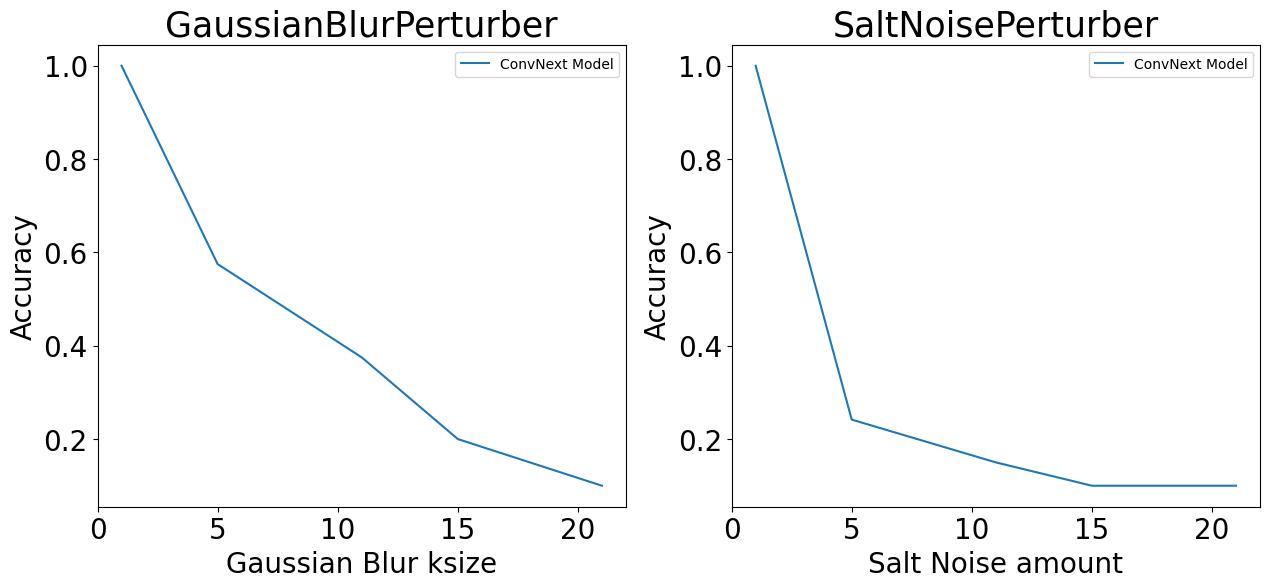
The accuracy metric values (generated above) are visualized as item-response curves to understand the robustness of the model to varying degree of Blur and Salt noise perturbations. From the plots below, we can see a sharp drop in accuracy of the model on increasing the perturbation intensity.
fig, axes = plt.subplots(1, 2, figsize=(15, 6))  # Create 1-row, 2-column grid

_ = axes[0].plot(
    blur_perturbation_values,
    [m["MulticlassAccuracy"] for m in gauss_blur_perturbed_metrics],
    label="ConvNext Model",
)
axes[0].set_title("GaussianBlurPerturber", fontsize=25)
axes[0].set_xlabel("Gaussian Blur ksize", fontsize=20)
axes[0].set_ylabel("Accuracy", fontsize=20)
axes[0].tick_params(axis="both", which="major", labelsize=20)
_ = axes[0].legend()

# Salt noise results
_ = axes[1].plot(
    blur_perturbation_values,
    [m["MulticlassAccuracy"] for m in salt_noise_perturbed_metrics],
    label="ConvNext Model",
)
axes[1].set_title("SaltNoisePerturber", fontsize=25)
axes[1].set_xlabel("Salt Noise amount", fontsize=20)
axes[1].set_ylabel("Accuracy", fontsize=20)
axes[1].tick_params(axis="both", which="major", labelsize=20)
_ = axes[1].legend()
Generate and Evaluate Saliency Maps#
Initialize RISE (with Debiasing) Saliency Method#
We initialize the RISE saliency method with debiasing along with the MAITE-compliant JATICImageClassifier wrapper for generating saliency maps based on model-inference.
from xaitk_jatic.interop.image_classification.model import JATICImageClassifier
from xaitk_saliency.impls.gen_image_classifier_blackbox_sal.rise import RISEStack

# Saliency prep
model_mean = [95, 96, 93]

blackbox_fill = np.uint8(np.asarray(model_mean) * 255)
gen_rise_debiased = RISEStack(n=200, s=8, p1=0.5, seed=seed, threads=4, debiased=True)
gen_rise_debiased.fill = blackbox_fill.astype(int)

# XAITK-MAITE interop model wrapper for Image Classification
jatic_classifier = JATICImageClassifier(
    classifier=maite_classifier,
    ids=sorted(maite_classifier.id2label.keys()),
    img_batch_size=1,
)
Interpretability Analysis#
Visualization Helper Function#
This is the helper function to organize the output into a plot with the input image, ground truth (GT) saliency map, and predicted saliency map displayed side by side.
from matplotlib.axes import Axes
from matplotlib.figure import Figure


def visualize_saliency(  # noqa: C901
    pert_images: list[np.ndarray],
    truth_labels: list[str],
    sal_maps_1: list[np.ndarray],
    truth_scores_1: list[float],
    pred_labels_1: list[str],
    pred_scores_1: list[float],
    perturb_param: str,
    perturb_values: list[float],
) -> tuple[Figure, list[Axes]]:
    """Visualize reference image and corresponding saliency maps.

    This function creates the visualization for the NRTK-XAITK quick task.
    It has three columns: a perturbed image, the saliency with respect to the true
    class, and the saliency with respect to the predicted class.
    This is repeated for the variable number of perturbations provided. For the quick task,
    the first 'perturbation' was the unperturbed, baseline image. All arguments are lists

    Returns:
        tuple: (figure object, list of axis objects)
    """
    # Determine layout dimensions
    n_cols = 3
    n_rows = len(sal_maps_1)

    fontsize = 20
    fontdiff = 4

    # Create figure and axes grid
    fig, axes = plt.subplots(n_rows, n_cols, figsize=(n_cols * 4, n_rows * 3))

    axes = axes.flatten()
    for (
        perturb_index,
        pert_image,
        truth_label,
        sal_map_1,
        truth_score_1,
        pred_label_1,
        pred_score_1,
        perturb_value,
    ) in zip(
        range(n_rows),
        pert_images,
        truth_labels,
        sal_maps_1,
        truth_scores_1,
        pred_labels_1,
        pred_scores_1,
        perturb_values,
        strict=False,
    ):
        base_ind = perturb_index * n_cols
        for spine in axes[base_ind].spines.values():
            spine.set_visible(False)
        axes[base_ind].imshow(pert_image)
        axes[base_ind].set_xticks([])
        axes[base_ind].set_yticks([])
        if perturb_index == 0:
            axes[base_ind].text(
                0.5,
                1.1,
                "Perturb Value",
                transform=axes[base_ind].transAxes,
                ha="center",
                va="bottom",
                fontsize=fontsize,
                fontweight="bold",
            )
        axes[base_ind].text(
            0.5,
            0.99,
            f"{perturb_param}: {round(perturb_value, ndigits=2)}",
            transform=axes[base_ind].transAxes,
            ha="center",
            va="bottom",
            fontsize=fontsize - fontdiff,
            fontweight="bold",
        )
        axes[base_ind + 1].set_axis_off()

        color_1 = "green" if truth_label == pred_label_1 else "red"

        # Plot saliency maps
        truth_pos_map_1 = np.clip(sal_map_1[0], 0, 1)
        pred_pos_map_1 = np.clip(sal_map_1[1], 0, 1)

        # Saliency of GT label
        axes[base_ind + 1].imshow(pert_image, alpha=0.7)
        axes[base_ind + 1].imshow(truth_pos_map_1, cmap="jet", alpha=0.3, vmin=0, vmax=1)
        if perturb_index == 0:
            axes[base_ind + 1].text(
                0.5,
                1.3,
                "ConvNext Model",
                transform=axes[base_ind + 1].transAxes,
                ha="center",
                va="bottom",
                fontsize=fontsize,
                fontweight="bold",
            )
            axes[base_ind + 1].text(
                0.5,
                1.1,
                "Truth",
                transform=axes[base_ind + 1].transAxes,
                ha="center",
                va="bottom",
                fontsize=fontsize,
                fontweight="bold",
            )
        axes[base_ind + 1].text(
            0.5,
            0.99,
            f"{truth_label}: {truth_score_1:.2f}",
            transform=axes[base_ind + 1].transAxes,
            ha="center",
            va="bottom",
            fontsize=fontsize - fontdiff,
            fontweight="bold",
        )

        # Saliency of predicted label
        axes[base_ind + 2].set_axis_off()
        axes[base_ind + 2].imshow(pert_image, alpha=0.7)
        axes[base_ind + 2].imshow(pred_pos_map_1, cmap="jet", alpha=0.3, vmin=0, vmax=1)
        if perturb_index == 0:
            axes[base_ind + 2].text(
                0.5,
                1.1,
                "Prediction",
                transform=axes[base_ind + 2].transAxes,
                ha="center",
                va="bottom",
                fontsize=fontsize,
                fontweight="bold",
            )
        axes[base_ind + 2].text(
            0.5,
            0.99,
            f"{pred_label_1}: {pred_score_1:.2f}",
            transform=axes[base_ind + 2].transAxes,
            ha="center",
            va="bottom",
            color=color_1,
            fontsize=fontsize - fontdiff,
            fontweight="bold",
        )

    plt.tight_layout()
    fig.subplots_adjust(wspace=0.00, hspace=0.2)
    return fig, axes
Visualize Saliency for a Sample Image Perturbed Using the GaussianBlurPerturber#
Below, we visualize a sample image from each of the generated perturbation-saliency datasets created using the GaussianBlurPerturber.
_, ax = visualize_saliency(
    [
        results_dict["convnext"][f"GaussianBlurPerturber_ksize_{val}"]["perturbed_images"][example_img_id]
        for val in blur_perturbation_values
    ],
    [
        results_dict["convnext"][f"GaussianBlurPerturber_ksize_{val}"]["truth_labels"][example_img_id]
        for val in blur_perturbation_values
    ],
    [
        results_dict["convnext"][f"GaussianBlurPerturber_ksize_{val}"]["sal_maps"][example_img_id]
        for val in blur_perturbation_values
    ],
    [
        results_dict["convnext"][f"GaussianBlurPerturber_ksize_{val}"]["truth_scores"][example_img_id]
        for val in blur_perturbation_values
    ],
    [
        results_dict["convnext"][f"GaussianBlurPerturber_ksize_{val}"]["pred_labels"][example_img_id]
        for val in blur_perturbation_values
    ],
    [
        results_dict["convnext"][f"GaussianBlurPerturber_ksize_{val}"]["pred_scores"][example_img_id]
        for val in blur_perturbation_values
    ],
    "ksize",
    [
        results_dict["convnext"][f"GaussianBlurPerturber_ksize_{val}"]["perturb_values"][example_img_id]
        for val in blur_perturbation_values
    ],
)
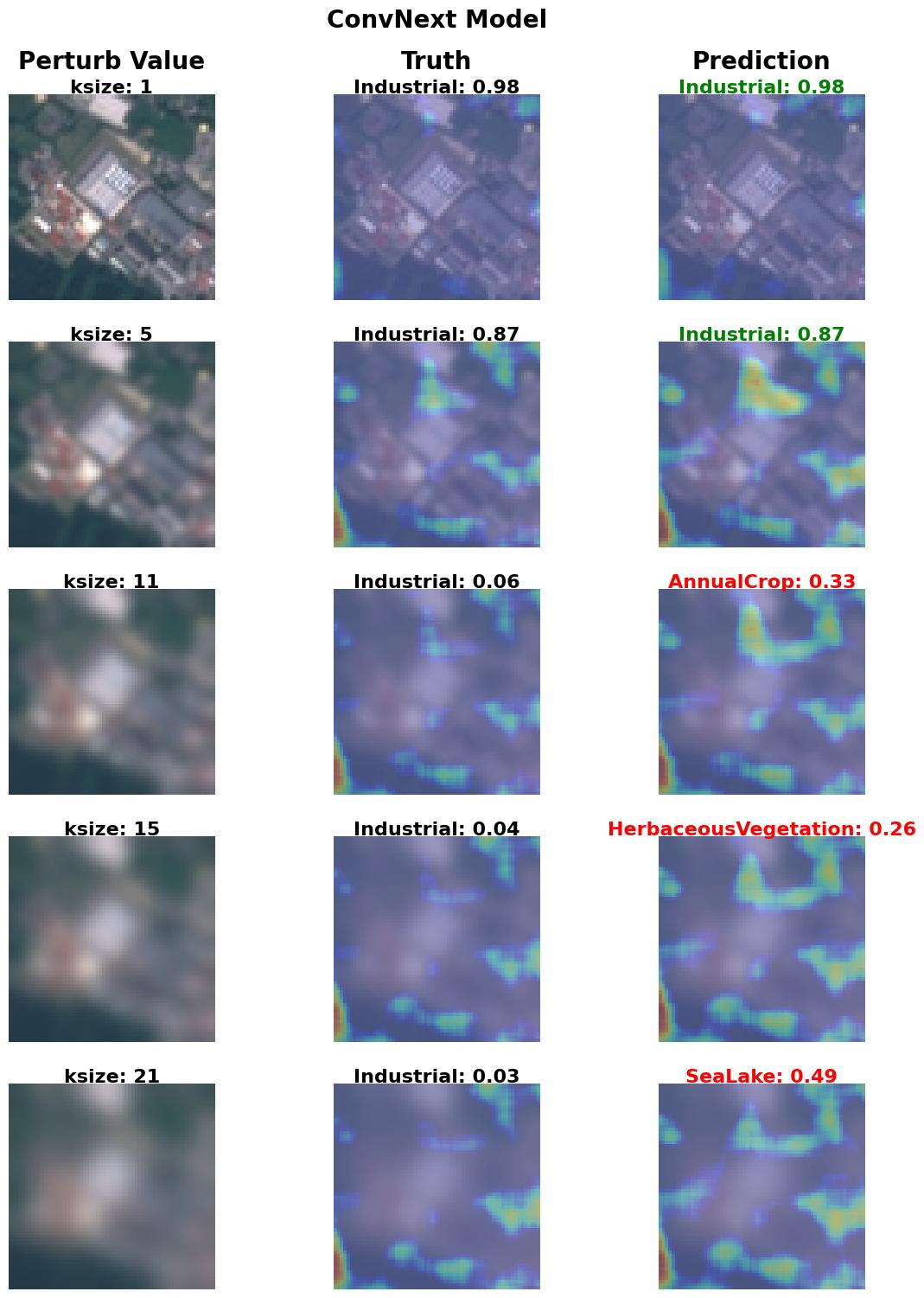
From the results above, we can observe the increasing blur intensity causing the saliency maps to focus more on the vegetation area. With light-moderate blur intensity, the generated saliency map focuses on the greener area in the image, which results in choosing either AnnualCrop or HerbaceousVegetation (some form of vegetation) as the predicted class. At a high blur intensity, the image is predicted to be a SeaLake (some form of water body).
Below is a summary of the saliency metrics for the sample image perturbed with the GaussianBlurPerturber. From this table, we can observe that the SSD - Sum of Squared Difference between the GT and predicted saliency map shows a higher deviation with the increase in blur intensity.
metrics_df.loc[
    (metrics_df["image_id"] == example_img_id) & (metrics_df["perturb_config"].str.contains("GaussianBlur")),
    ["perturb_config", "entropy", "ssd", "xcorr"],
].round(decimals=3).set_index("perturb_config")
| entropy | ssd | xcorr | |
|---|---|---|---|
| perturb_config | |||
| GaussianBlurPerturber_ksize_1 | 11.822 | 0.078 | 0.919 |
| GaussianBlurPerturber_ksize_5 | 11.881 | 0.188 | 0.934 |
| GaussianBlurPerturber_ksize_11 | 11.888 | 0.196 | 0.956 |
| GaussianBlurPerturber_ksize_15 | 11.878 | 0.264 | 0.953 |
| GaussianBlurPerturber_ksize_21 | 11.871 | 0.288 | 0.949 |
Visualize Saliency for a Sample Image Perturbed using the SaltNoisePerturber#
Below, we visualize a sample image from each of the generated perturbation-saliency datasets created using the SaltNoisePerturber.
_, ax = visualize_saliency(
    [
        results_dict["convnext"][f"SaltNoisePerturber_amount_{val}"]["perturbed_images"][example_img_id]
        for val in noise_perturbation_values
    ],
    [
        results_dict["convnext"][f"SaltNoisePerturber_amount_{val}"]["truth_labels"][example_img_id]
        for val in noise_perturbation_values
    ],
    [
        results_dict["convnext"][f"SaltNoisePerturber_amount_{val}"]["sal_maps"][example_img_id]
        for val in noise_perturbation_values
    ],
    [
        results_dict["convnext"][f"SaltNoisePerturber_amount_{val}"]["truth_scores"][example_img_id]
        for val in noise_perturbation_values
    ],
    [
        results_dict["convnext"][f"SaltNoisePerturber_amount_{val}"]["pred_labels"][example_img_id]
        for val in noise_perturbation_values
    ],
    [
        results_dict["convnext"][f"SaltNoisePerturber_amount_{val}"]["pred_scores"][example_img_id]
        for val in noise_perturbation_values
    ],
    "salt_noise_amount",
    [
        results_dict["convnext"][f"SaltNoisePerturber_amount_{val}"]["perturb_values"][example_img_id]
        for val in noise_perturbation_values
    ],
)
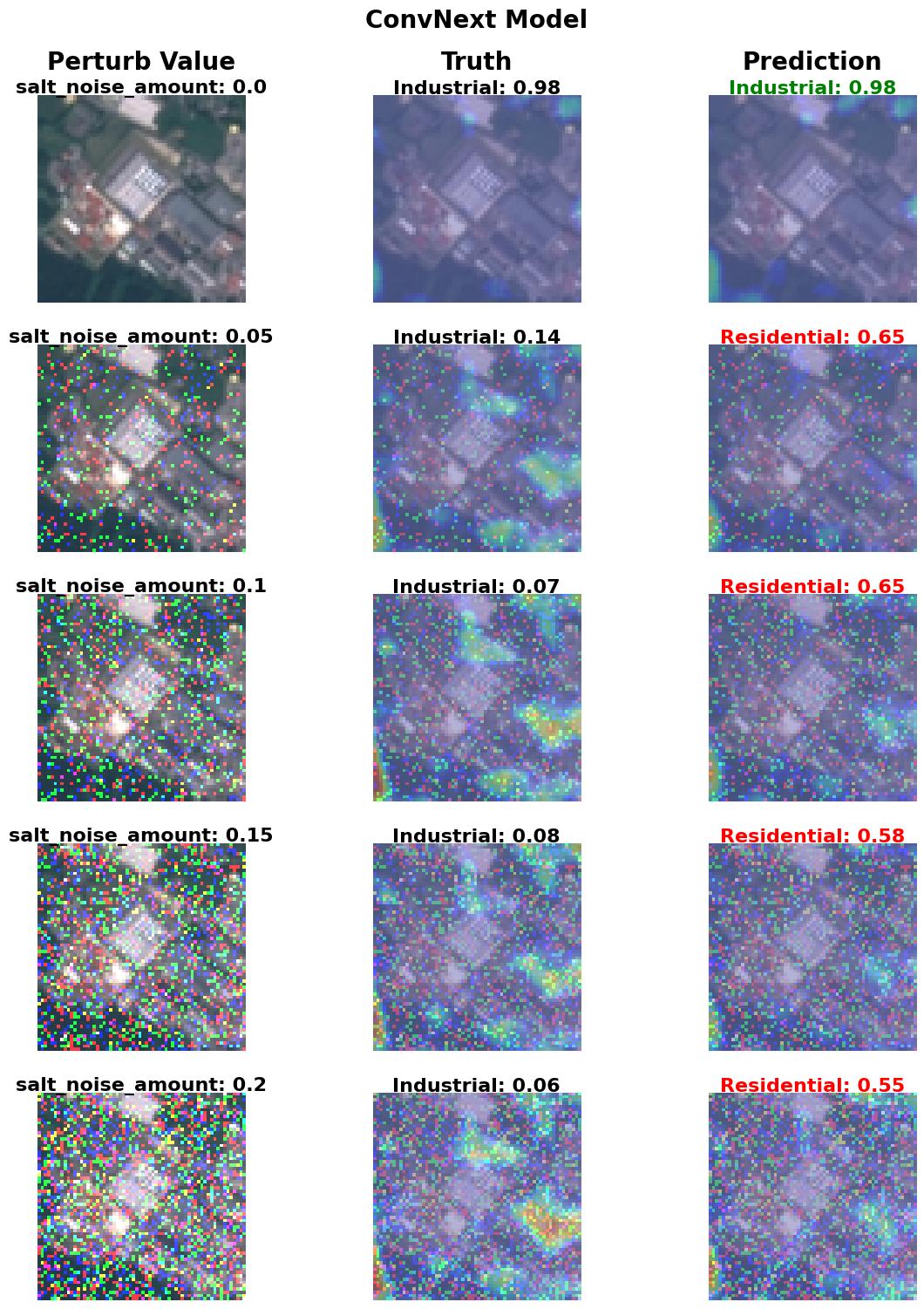
From the results above, we can observe the increasing salt noise intensity causing the saliency maps to shift their focus away from the image edge features that indicate the presence of an Industrial area. The shifted focus enables the central regions of the image to become more salient, which classifies the image under the Residential category.
Below is a summary of the saliency metrics for the sample image perturbed with the SaltNoisePerturber. From this table, we can observe that the SSD - Sum of Squared Difference between the GT and predicted saliency map shows a sudden deviation and maintains a particular range of values as the salt noise amount increases. Also, the XCorr - Normalized Cross Correlation metric with the SaltNoisePerturber example is less stable compared to the GaussianBlurPerturber output.
metrics_df.loc[
    (metrics_df["image_id"] == example_img_id) & (metrics_df["perturb_config"].str.contains("SaltNoise")),
    ["perturb_config", "entropy", "ssd", "xcorr"],
].round(decimals=3).set_index("perturb_config")
| entropy | ssd | xcorr | |
|---|---|---|---|
| perturb_config | |||
| SaltNoisePerturber_amount_0.0 | 11.822 | 0.078 | 0.919 |
| SaltNoisePerturber_amount_0.05 | 11.923 | 0.420 | 0.835 |
| SaltNoisePerturber_amount_0.1 | 11.869 | 0.392 | 0.852 |
| SaltNoisePerturber_amount_0.15 | 11.896 | 0.360 | 0.844 |
| SaltNoisePerturber_amount_0.2 | 11.895 | 0.373 | 0.854 |
Conclusion#
Based on visualizing the saliency maps on two different perturbed image samples, we were able to observe how the predictions shifted focus to larger blobs (like the vegetation area classes) as the blur intensity increased. On the other hand, we also observed how the spatial emphasis of the predictions shifted from the edge of the image to the central regions of the image as the salt noise intensity changed.
Similarly, through this NRTK-XAITK Perturbation Saliency analysis, we presented an end-to-end workflow that enables modular interpretability and explainability of a model’s and dataset’s robustness to natural or physics-based perturbations.