Demonstrating Visual Focus Perturbations
Introduction
This notebook is part of the NRTK demonstration suite, demonstrating how perturbations can be applied and their impact measured via MAITE evaluation workflows.
Layout
This notebook demonstrates how a particular sensor condition (in this case, Visual Focus), can affect an object detection model, and how that impact can be measured. The overall structure is:
Traditional vs. relative mAP:
An overview of the nuances of what we’ll be evaluating.
Setup:
Notebook initialization, loading the supporting python code. Depending on if this is the first time you’ve run this notebook, this may take some time.
Loading the source image, which will be used throughout the notebook.
Image perturbation examples:
The NRTK perturbation is demonstrated on the source image.
Baseline detections:
The object detection model is loaded and run on the unperturbed image. These will serve as “ground truth” for comparisons against the perturbed images.
At this point, we have the fundamental elements of our evaluation: the model, our reference image, and a mechanism for creating the perturbed test images. Next we adapt these elements to be used with the MAITE evaluation workflow:
Wrapping the detection model
Wrapping the reference image as a dataset
Wrapping the perturbation as augmentation objects
Wrapping the metrics
After the evaluation elements have been wrapped, we can run the evaluation:
Preparing the augmentations:
We specify the range of perturbation values to evaluate and optionally specify which ones we’d like to visualize.
Evaluation of augmented data:
Each augmentation is run through MAITE’s evaluation workflow, computing the mean average precision metric relative to the unperturbed detections.
Evaluation analysis:
We plot and discuss the mAP@50 metric from each of the perturbed images, as well as per-class and per-area results.
Evaluation guidance: traditional vs. relative mAP
This notebook will be evaluating the perturbed images using mean average precision (mAP) relative to detections from the unperturbed image. Traditional mAP scores the computed detections to ground-truth annotations vetted by an analyst; the mAP metric indicates how well the detector does compared to that analyst and thus measures the detector’s “absolute” performance (“absolute” in the sense that the assumption is no detector can do better than the analyst.)
In contrast, in this notebook, we’re not concerned with the absolute ability of the detector to find objects of interest. Rather, we’re interested in how the perturbations affect the detector relative to the unperturbed image. It’s expected that the detector won’t find every target in the unperturbed image; instead, we’re measuring the change in the detections (or classifications) caused by the perturbations.
To support relative mAP, we’ll be computing detections on the unperturbed image and using those as our “ground truth” dataset, and using the MAITE dataset class slightly differently than usual. For example, there’s no on-disk json file of reference annotations with an associated data loader; instead, we’ll be taking the computed detections and manually copying them over into the dataset.
Setup: Notebook initialization
The next few cells import the python packages used in the rest of the notebook.
Note: We are suppressing warnings within this notebook to reduce visual clutter for demonstration purposes. If any issues arise while executing this notebook, we recommend that the first cell is not executed so that any related warnings are shown.
from __future__ import annotations

# warning suppression
import warnings

warnings.filterwarnings("ignore")
import sys  # noqa: F401

print("Beginning package installation...")
!{sys.executable} -m pip install -qU pip

print("Installing required packages...")
!{sys.executable} -m pip install -q "matplotlib" --no-cache-dir
!{sys.executable} -m pip install -q "torchvision" --no-cache-dir
!{sys.executable} -m pip install -q "torchmetrics" --no-cache-dir
!{sys.executable} -m pip install -q "ultralytics" --no-cache-dir

# OpenCV must be uninstalled and reinstalled last due to other packages installing OpenCV
print("Doing a fresh install of opencv-python-headless...")
!{sys.executable} -m pip uninstall -qy "opencv-python" "opencv-python-headless"
!{sys.executable} -m pip install -q "opencv-python-headless" --no-cache-dir
Beginning package installation...
Installing required packages...
Doing a fresh install of opencv-python-headless...
import os
import urllib.request
from collections.abc import Sequence
from typing import Any

import numpy as np

# some initial imports
%matplotlib inline
%config InlineBackend.figure_format = "jpeg"  # Use JPEG format for inline visualizations

from matplotlib import pyplot as plt
from PIL import Image

from nrtk.impls.perturb_image.pybsm.defocus_otf_perturber import DefocusOTFPerturber
Setup: Source image
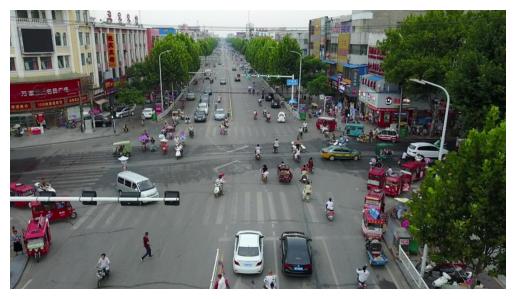
In the next cell, we’ll download and display a source image from the VisDrone dataset. The image will be cached in a local data subdirectory.
A note on image storage
Typically in ML workflows, batches of images are processed as tensors of the color channels. Both our perturber (NRTK) and object detector (YOLO) accept numpy ndarray objects, and we will use matplotlib.imshow to view them. The complication is that although YOLO inferences on ndarray, it expects the color channels to be in BGR order. If we naively view the same data YOLO inferences on, the colors will be wrong; if we naively inference on what we view, the detections will be wrong. (Our NRTK perturbation is agnostic to the channel order.)
In this notebook, we’ll convert the channel order to BGR when we load, and convert back whenever we explicitly call imshow.
data_dir = "./data"
os.makedirs(data_dir, exist_ok=True)
img_path = os.path.join(data_dir, "visdrone_img.jpg")
if not os.path.isfile(img_path):
    url = "https://data.kitware.com/api/v1/item/623880f14acac99f429fe3ca/download"
    _ = urllib.request.urlretrieve(url, img_path)  # noqa: S310

img_pil = Image.open(img_path)
img_nd_bgr = np.asarray(img_pil)[
    :,
    :,
    ::-1,
]  # tip o' the hat to https://stackoverflow.com/questions/4661557/pil-rotate-image-colors-bgr-rgb
print(img_nd_bgr.shape)
plt.figure()
plt.axis("off")

_ = plt.imshow(img_nd_bgr[:, :, ::-1])  # explicitly changing BGR to RGB for imshow
(540, 960, 3)
NRTK De-focus OTF perturbation: examples and guidance
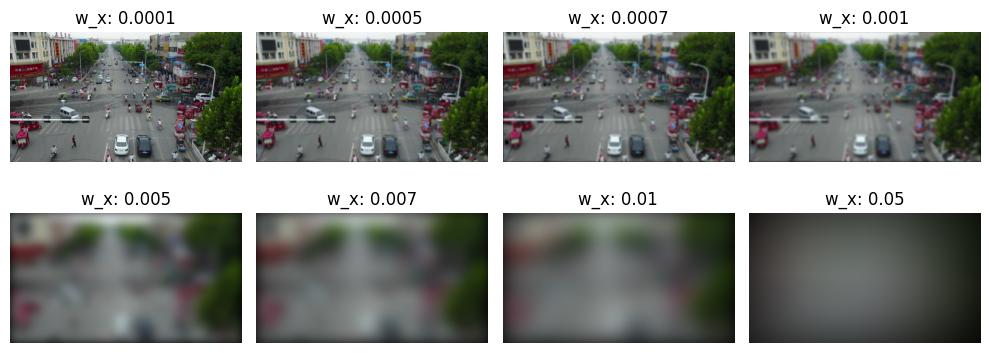
The Defocus OTF applies the effects of optics defocus to the image, modeled as a gaussian blur. This function sets the width of the Gaussian blur in the spatial domain in terms of ‘angular extent’, which is given by the instantaneous field-of-view (IFOV) for each pixel (see image below for calculation). The angle for each pixel is approximately pixel_size/focal_length (radians) — wx and wy scale the blur size in units of IFOV. For example, we can blur the image with an approximately 5 pixel blur kernel by setting wx and wy = 5 * pixel_size/focal_length = 5 * IFOV.
The De-focus OTF perturbation is set by two parameters w_x and w_y which work to define the blur spot used to simulate the sensor de-focus:
w_x: the 1/e blur spot radii in the x directionw_y: the 1/e blur spot radii in the y direction
For the purpose of this notebook we will keep the values of these two parameters equal.
w_x == 0.0: The perturber is undefined at exactly 0 due to the size 0 blur it creates.0.0 < w_x: Creates a blur spot of sizew_x*w_ythat is used to de-focus the image
A normal IFOV value is on the order of 1e-6, and since w_x and w_y are in the same units as IFOV, a value of 10e3 larger than the normal IFOV value results in a blur kernel that extends to a high proportion of the size of the image in the frequency domain resulting in a largely blurred/defocused image.
_, ax = plt.subplots(2, 4, figsize=(10, 4))
for idx, w_x in enumerate((0.0001, 0.0005, 0.0007, 0.001, 0.005, 0.007, 0.01, 0.05)):
    (row, col) = (int(idx / 4), idx % 4)
    bp = DefocusOTFPerturber(w_x=w_x, w_y=w_x)
    ax[row, col].set_title(f"w_x: {w_x}")
    ax[row, col].imshow(bp(img_nd_bgr)[0][:, :, ::-1])
    _ = ax[row, col].axis("off")
plt.tight_layout()
Baseline detections
In the next cell, we’ll download a YOLOv11 model, compute object detections on the source image, and display the results. As discussed above, these detections will serve as the “ground truth” for our relative mAP evaluation later.
Note that here, we’re using YOLO’s built-in visualization tool, which automatically adjusts for BGR / RGB order.
# Import YOLO support
import ultralytics

ultralytics.checks()
print("Downloading model...")
model = ultralytics.YOLO("yolo11n.pt")
print("Computing baseline...")
baseline = model(img_nd_bgr)
Ultralytics 8.3.85 🚀 Python-3.10.12 torch-2.6.0+cu124 CPU (11th Gen Intel Core(TM) i9-11950H 2.60GHz)
Setup complete ✅ (16 CPUs, 62.5 GB RAM, 329.2/914.7 GB disk)
Downloading model...
Computing baseline...

0: 384x640 5 persons, 15 cars, 1 motorcycle, 2 trucks, 62.1ms
Speed: 4.0ms preprocess, 62.1ms inference, 1.2ms postprocess per image at shape (1, 3, 384, 640)
MAITE Evaluation workflow preparation
We’ll use the MAITE Evaluation workflow to evaluate the performance of the perturbed data against our baseline detections. We’ll need to “wrap” our model, data, and perturbations into callable objects to pass to the maite.workflows.evaluate function:
We’ll wrap the model to make predictions on input data when called.
The wrapped dataset will return our test image when called. Note that this will be the original, unperturbed image; we’ll apply our perturbations via…
…the augmentation object, which applies the perturbation to the image inside the evaluation.
Finally, the metric object will define our precise scoring methodology.
The evaluation workflow in this notebook is slightly unusual. Typical ML workflows apply many different augmentations / perturbations to much larger datasets, and only call evaluate once to get a statistical view of performance. But since the goal of this notebook is to drill down into how perturbation affects performance, we’ve essentially flipped process, calling evaluate (and thus our wrapped objects) many times, once per loop on our single image perturbed to a known degree, and then observing how the metrics respond.
Some helper classes
The following cell adds two classes to allow us to use YOLO detections with the MAITE evaluation workflow:
The
YOLODetectionTargethelper class that stores the bounding boxes, label indices, and confidence scores for a single image’s detections.The
MaiteYOLODetectionadapter class that conforms to the MAITE Object Detection Dataset protocol by providing the__len__and__getitem__methods. The returned item is a tuple of (image,YOLODetectionTarget, metadata-dictionary).
from dataclasses import dataclass

import torch
from maite.protocols.object_detection import DatumMetadataType

from nrtk.interop.maite.interop.object_detection.dataset import JATICObjectDetectionDataset

##
## Helper class for containing the boxes, label indices, and confidence scores.
##


@dataclass
class YOLODetectionTarget:
    """
    A helper class to represent object detection results in the format expected by YOLO-based models.

    Attributes:
        boxes (torch.Tensor): A tensor containing the bounding boxes for detected objects in
            [x_min, y_min, x_max, y_max] format.
        labels (torch.Tensor): A tensor containing the class labels for the detected objects.
            These may be floats for compatibility with specific datasets or tools.
        scores (torch.Tensor): A tensor containing the confidence scores for the detected objects.
    """

    boxes: torch.Tensor
    labels: torch.Tensor
    scores: torch.Tensor


##
## Prepare results for ingestion into maite dataset by puttin them into detection object
## Images must be channel first (c, h, w) in maite dataset objects
##
imgs = [np.transpose(img_nd_bgr, (2, 0, 1))]
dets = []
metadata: list[DatumMetadataType] = [{"id": 0}]
for _detection in baseline:
    boxes = baseline[0].boxes.xyxy.cpu()
    labels = baseline[0].boxes.cls.cpu()  # note, these are floats, not ints
    scores = baseline[0].boxes.conf.cpu()

    dets.append(YOLODetectionTarget(boxes, labels, scores))
(1) Wrapping the detection model
The first object we’ll wrap will be the detection model. The cell below defines a class adapting YOLO for the MAITE Object Detection Model protocol. The __call__ method runs the model on images in the batch and is called by the MAITE evaluation workflow later in the notebook.
import maite.protocols.object_detection as od
import ultralytics.models
from maite.protocols import ArrayLike, ModelMetadata


class MaiteYOLODetector:
    """
    A wrapper class for a YOLO model to simplify its usage with input batches and object detection targets.

    This class takes a YOLO model instance, processes input image batches, and converts predictions into
    `YOLODetectionTarget` instances.

    Attributes:
        _model (ultralytics.models.yolo.model.YOLO): The YOLO model instance used for predictions.

    Methods:
        __call__(batch):
            Processes a batch of images through the YOLO model and returns the predictions as
            `YOLODetectionTarget` instances.
    """

    def __init__(self, model: ultralytics.models.yolo.model.YOLO) -> None:
        """
        Initializes the MaiteYOLODetector with a YOLO model instance.

        Args:
            model (ultralytics.models.yolo.model.YOLO): The YOLO model to use for predictions.
        """
        self._model = model
        # Dummy model metadata type to pass type checking
        self.metadata = ModelMetadata(id="0")

    def __call__(self, batch: Sequence[ArrayLike]) -> Sequence[YOLODetectionTarget]:
        """
        Processes a batch of images using the YOLO model and converts the predictions to `YOLODetectionTarget`
        instances.

        Args:
            batch (Sequence[ArrayLike]): A batch of images in (c, h, w) format (channel-first).

        Returns:
            Sequence[YOLODetectionTarget]: A list of YOLODetectionTarget instances containing the predictions for each
            image in the batch.
        """
        # Convert images to channel-last format (h, w, c) for YOLO model
        batch_transposed = [np.transpose(batch[i], (1, 2, 0)) for i in range(len(batch))]

        yolo_predictions = self._model(batch_transposed, verbose=False)
        return [
            YOLODetectionTarget(
                p.boxes.xyxy.cpu(),  # Bounding boxes in (x_min, y_min, x_max, y_max) format
                p.boxes.cls.cpu(),  # Class indices for the detected objects
                p.boxes.conf.cpu(),  # Confidence scores for the detections
            )
            for p in yolo_predictions
        ]


# create the wrapped model object
yolo_model: od.Model = MaiteYOLODetector(model)
(2) Wrapping the dataset
MAITE pairs images and their reference detections (aka targets, ground truth) into datasets. Typical ML workflows have many images per dataset; when these do not all fit in memory simultaneously, a dataloader object is used which can page images and annotations in from disk. For this notebook, however, each invocation of evaluate will use the same single-image dataset (our reference image with its baseline detections.)
# our single image, its baseline detections, and metadata dictionary
# switch image to channel first
single_image_dataset: od.Dataset = JATICObjectDetectionDataset(imgs, dets, metadata, dataset_id="visdrone_ex")
(3) Wrapping the perturbations as augmentations
The evaluate function will perturb the image from the dataset using instances of the class defined below, one instance per perturbation value. Note that the object doesn’t perform any augmentations until called by the evaluate workflow.
from nrtk.interop.maite.interop.object_detection.augmentation import JATICDetectionAugmentation

bp = DefocusOTFPerturber(w_x=0.00001, w_y=0.000001)
identity_augmentation = JATICDetectionAugmentation(bp, augment_id="identity")
(4) Wrapping the metrics
We’ll compare the detections in each perturbed image to the unperturbed detections using the Mean Average Precision (mAP) metric from the torchmetrics package. The following cell creates a mAP metrics object, wraps it in a MAITE MAITE Object Detection Metric protocol-compatible class, and then creates an instance of this class, which will be called by evaluate.
This code is copied directly from the MAITE object detection tutorial (with the exception of setting class_metrics=True.)
from maite.protocols import MetricMetadata
from torchmetrics import Metric as TorchMetric
from torchmetrics.detection.mean_ap import MeanAveragePrecision

##
## Create an instance of the MAP metric object
##

tm_metric = MeanAveragePrecision(
    box_format="xyxy",
    iou_type="bbox",
    iou_thresholds=[0.5],
    rec_thresholds=[0.0, 0.1, 0.2, 0.3, 0.4, 0.5, 0.6, 0.7, 0.8, 0.9, 1.0],
    max_detection_thresholds=[1, 10, 100],
    class_metrics=True,
    extended_summary=False,
    average="macro",
)

##
## This wrapper associates the MAP metric object with methods called by the evaluate
## workflow to accumulate detection data and compute the metrics.
##


class WrappedTorchmetricsMetric:
    """
    A wrapper class for a Torchmetrics metric designed to simplify its usage for object detection tasks.

    This class facilitates the conversion of object detection targets and predictions into the format
    expected by Torchmetrics metrics, allowing for easier integration with existing pipelines.

    Attributes:
        _tm_metric (Callable): The Torchmetrics metric to be wrapped, which takes lists of dictionaries
            containing torch.Tensor objects representing predictions and targets.

    Methods:
        to_tensor_dict(target):
            Converts an `ObjectDetectionTarget` into a dictionary format compatible with the Torchmetrics
            metric's `update` method.

        update(preds, targets):
            Updates the wrapped Torchmetrics metric with batches of predictions and targets in their native format.

        compute():
            Computes the final metric values using the wrapped Torchmetrics metric.

        reset():
            Resets the state of the wrapped Torchmetrics metric.
    """

    def __init__(
        self,
        tm_metric: TorchMetric,
    ) -> None:
        """
        Initializes the WrappedTorchmetricsMetric with the given Torchmetrics metric.

        Args:
            tm_metric (Callable): A Torchmetrics metric instance that expects predictions and targets as lists of
                dictionaries containing torch.Tensor objects.
        """
        self._tm_metric = tm_metric
        # Dummy metric metadata type to pass type checking
        self.metadata = MetricMetadata(id="0")

    @staticmethod
    def to_tensor_dict(target: od.ObjectDetectionTarget) -> dict[str, torch.Tensor]:
        """
        Converts an ObjectDetectionTarget into a dictionary format compatible with the Torchmetrics metric's
        `update` method.

        Args:
            target (od.ObjectDetectionTarget): An object detection target instance containing boxes, labels, and scores.

        Returns:
            dict[str, torch.Tensor]: A dictionary with keys `boxes`, `scores`, and `labels`, each mapping to a tensor.
        """
        return {
            "boxes": torch.as_tensor(target.boxes),
            "scores": torch.as_tensor(target.scores),
            "labels": torch.as_tensor(target.labels).type(torch.int64),
        }

    def update(self, preds: od.TargetBatchType, targets: od.TargetBatchType) -> None:
        """
        Updates the wrapped Torchmetrics metric with the given predictions and targets.

        Args:
            preds (od.TargetBatchType): A batch of predictions in the format expected by the Torchmetrics metric.
            targets (od.TargetBatchType): A batch of targets in the format expected by the Torchmetrics metric.
        """
        preds_tm = [self.to_tensor_dict(pred) for pred in preds]
        targets_tm = [self.to_tensor_dict(tgt) for tgt in targets]
        self._tm_metric.update(preds_tm, targets_tm)

    def compute(self) -> dict[str, Any]:
        """
        Computes and returns the final metric values using the wrapped Torchmetrics metric.

        Returns:
            dict[str, Any]: A dictionary containing the computed metric values.
        """
        return self._tm_metric.compute()

    def reset(self) -> None:
        """Resets the state of the wrapped Torchmetrics metric, clearing any accumulated data."""
        self._tm_metric.reset()


##
## This is our instance variable that can compute the MAP metrics.
##

mAP_metric: od.Metric = WrappedTorchmetricsMetric(tm_metric)  # noqa: N816
Running the evaluation
We now have all the wrappings required to evaluate our range of perturbations:
The
yolo_modelobject, wrapping the YOLO modelThe
single_image_datasetobject, providing our source image and its baseline detectionsThe
augmentationobject, which when instantiated, applies a single perturbation value to its inputThe
mAP_metricsobject, defining the metrics to compute at each perturbation value
Evaluation sanity check: ground truth against itself
Here we quickly check the evaluation workflow by creating an identity augmentation (with a brightness perturbation factor of 1.0, leaving the image unchanged) and scoring it. The detections should also be unchanged from the baseline and thus give an mAP of 1.0.
from maite.workflows import evaluate

# call the model for each image in the dataset (in this case, just the source image),
# scoring the resulting detections against those from the dataset
sanity_check_results, _, _ = evaluate(
    model=yolo_model,
    dataset=single_image_dataset,
    augmentation=identity_augmentation,
    metric=mAP_metric,
)

print("Sanity check: overall mAP (should be 1.0):", sanity_check_results["map"].item())
100%|████████████████████████████████████████████████████████████████████████████████████████████████████████████████████████████████████████████████████████████████████████████████████████████████████████████| 1/1 [00:00<00:00, 4.01it/s]
Sanity check: overall mAP (should be 1.0): 1.0
Preparing the data
Now we’ll prepare the augmentation instances for the evaluation. In the cell below, you can set three parameters for sweeping the set of perturbation values:
sweep_low: the minimum perturbation value (must be >= 0)
sweep_high: the maximum perturbation value
sweep_count: how many perturbations to generation
You can also optionally select perturbations to visualize:
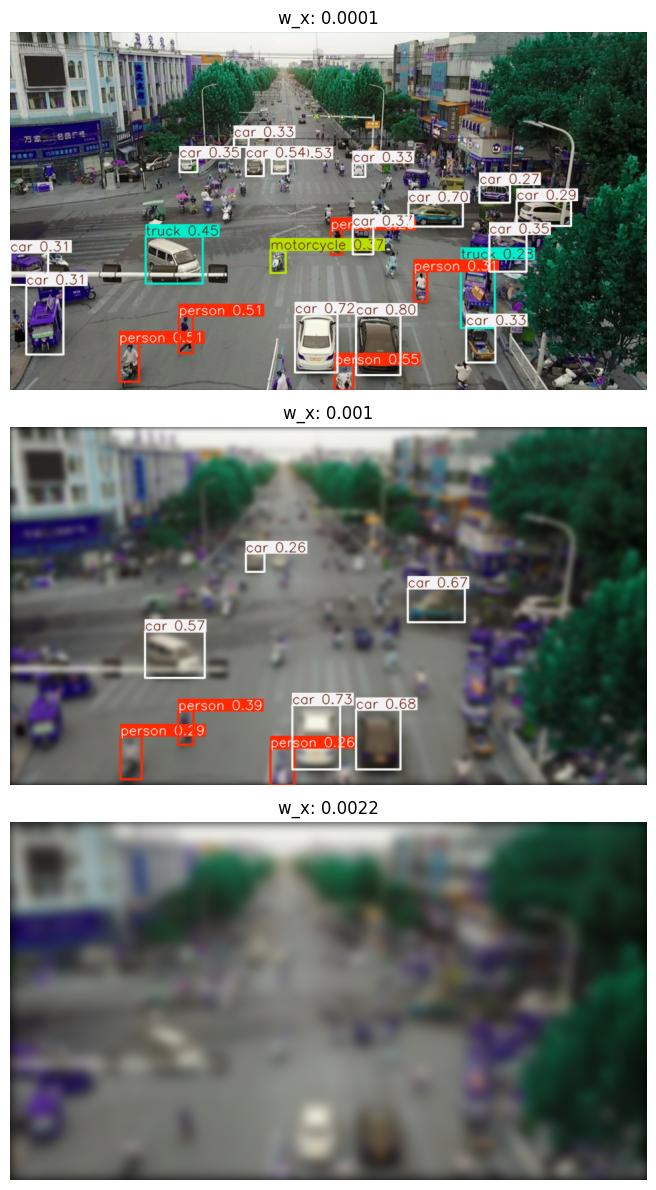
visualization_indices: a list of perturbation indices p, 0 <= p < sweep_count. These instances will be rendered along with their corresponding detections.
SWEEP_LOW = 0.0001
SWEEP_HIGH = 0.003
SWEEP_COUNT = 30
VISUALIZATION_INDICES = [0, 9, 21]

##
## end user-settable parameters
##

perturbation_values = np.linspace(SWEEP_LOW, SWEEP_HIGH, SWEEP_COUNT, endpoint=True)
augmentations = [
    JATICDetectionAugmentation(DefocusOTFPerturber(w_x=p, w_y=p), augment_id=str(idx))
    for idx, p in enumerate(perturbation_values)
]

print(f"Generated {len(augmentations)} perturbation augmentations")
Generated 30 perturbation augmentations
Calling evaluate on the augmented data
We loop over all the augmentations, calling evaluate on each one and building up a list of resulting metrics for analysis.
Any augmentation indices specified above will be rendered in this step.
perturbed_metrics = list()
_, ax = plt.subplots(len(VISUALIZATION_INDICES), figsize=(30, 12))
for idx, a in enumerate(augmentations):
    # reset the metric object for each dataset
    mAP_metric.reset()
    result, _, _ = evaluate(model=yolo_model, dataset=single_image_dataset, augmentation=a, metric=mAP_metric)
    perturbed_metrics.append(result)

    if idx in VISUALIZATION_INDICES:
        # quickest way is to re-evaluate
        w_x = a.augment.get_config()["w_x"]
        print(f"Perturbation #{idx}: w_x value {w_x:0.5}")
        datum = single_image_dataset[0]
        batch = ([datum[0]], [datum[1]], [datum[2]])
        # Extract the image from the augmentation and switch it to channel last
        aug = np.transpose(a(batch)[0][0], (1, 2, 0))
        # Plot image
        ax_idx = VISUALIZATION_INDICES.index(idx)
        ax[ax_idx].imshow(model(aug)[0].plot())
        ax[ax_idx].set_title(f"w_x: {w_x:0.5}")
        _ = ax[ax_idx].axis("off")
plt.tight_layout()
100%|████████████████████████████████████████████████████████████████████████████████████████████████████████████████████████████████████████████████████████████████████████████████████████████████████████████| 1/1 [00:00<00:00, 3.71it/s]
Perturbation #0: w_x value 0.0001
100%|████████████████████████████████████████████████████████████████████████████████████████████████████████████████████████████████████████████████████████████████████████████████████████████████████████████| 1/1 [00:00<00:00,  4.02it/s]
100%|████████████████████████████████████████████████████████████████████████████████████████████████████████████████████████████████████████████████████████████████████████████████████████████████████████████| 1/1 [00:00<00:00,  3.79it/s]
100%|████████████████████████████████████████████████████████████████████████████████████████████████████████████████████████████████████████████████████████████████████████████████████████████████████████████| 1/1 [00:00<00:00,  3.79it/s]
100%|████████████████████████████████████████████████████████████████████████████████████████████████████████████████████████████████████████████████████████████████████████████████████████████████████████████| 1/1 [00:00<00:00,  4.10it/s]
100%|████████████████████████████████████████████████████████████████████████████████████████████████████████████████████████████████████████████████████████████████████████████████████████████████████████████| 1/1 [00:00<00:00,  3.91it/s]
100%|████████████████████████████████████████████████████████████████████████████████████████████████████████████████████████████████████████████████████████████████████████████████████████████████████████████| 1/1 [00:00<00:00,  3.84it/s]
100%|████████████████████████████████████████████████████████████████████████████████████████████████████████████████████████████████████████████████████████████████████████████████████████████████████████████| 1/1 [00:00<00:00,  3.61it/s]
100%|████████████████████████████████████████████████████████████████████████████████████████████████████████████████████████████████████████████████████████████████████████████████████████████████████████████| 1/1 [00:00<00:00,  3.92it/s]
100%|████████████████████████████████████████████████████████████████████████████████████████████████████████████████████████████████████████████████████████████████████████████████████████████████████████████| 1/1 [00:00<00:00,  3.97it/s]
Perturbation #9: w_x value 0.001
100%|████████████████████████████████████████████████████████████████████████████████████████████████████████████████████████████████████████████████████████████████████████████████████████████████████████████| 1/1 [00:00<00:00,  3.98it/s]
100%|████████████████████████████████████████████████████████████████████████████████████████████████████████████████████████████████████████████████████████████████████████████████████████████████████████████| 1/1 [00:00<00:00,  3.51it/s]
100%|████████████████████████████████████████████████████████████████████████████████████████████████████████████████████████████████████████████████████████████████████████████████████████████████████████████| 1/1 [00:00<00:00,  3.36it/s]
100%|████████████████████████████████████████████████████████████████████████████████████████████████████████████████████████████████████████████████████████████████████████████████████████████████████████████| 1/1 [00:00<00:00,  4.28it/s]
100%|████████████████████████████████████████████████████████████████████████████████████████████████████████████████████████████████████████████████████████████████████████████████████████████████████████████| 1/1 [00:00<00:00,  4.00it/s]
100%|████████████████████████████████████████████████████████████████████████████████████████████████████████████████████████████████████████████████████████████████████████████████████████████████████████████| 1/1 [00:00<00:00,  4.23it/s]
100%|████████████████████████████████████████████████████████████████████████████████████████████████████████████████████████████████████████████████████████████████████████████████████████████████████████████| 1/1 [00:00<00:00,  3.89it/s]
100%|████████████████████████████████████████████████████████████████████████████████████████████████████████████████████████████████████████████████████████████████████████████████████████████████████████████| 1/1 [00:00<00:00,  4.09it/s]
100%|████████████████████████████████████████████████████████████████████████████████████████████████████████████████████████████████████████████████████████████████████████████████████████████████████████████| 1/1 [00:00<00:00,  3.52it/s]
100%|████████████████████████████████████████████████████████████████████████████████████████████████████████████████████████████████████████████████████████████████████████████████████████████████████████████| 1/1 [00:00<00:00,  3.50it/s]
100%|████████████████████████████████████████████████████████████████████████████████████████████████████████████████████████████████████████████████████████████████████████████████████████████████████████████| 1/1 [00:00<00:00,  3.25it/s]
100%|████████████████████████████████████████████████████████████████████████████████████████████████████████████████████████████████████████████████████████████████████████████████████████████████████████████| 1/1 [00:00<00:00,  3.67it/s]
Perturbation #21: w_x value 0.0022
100%|████████████████████████████████████████████████████████████████████████████████████████████████████████████████████████████████████████████████████████████████████████████████████████████████████████████| 1/1 [00:00<00:00,  3.83it/s]
100%|████████████████████████████████████████████████████████████████████████████████████████████████████████████████████████████████████████████████████████████████████████████████████████████████████████████| 1/1 [00:00<00:00,  3.47it/s]
100%|████████████████████████████████████████████████████████████████████████████████████████████████████████████████████████████████████████████████████████████████████████████████████████████████████████████| 1/1 [00:00<00:00,  3.38it/s]
100%|████████████████████████████████████████████████████████████████████████████████████████████████████████████████████████████████████████████████████████████████████████████████████████████████████████████| 1/1 [00:00<00:00,  3.67it/s]
100%|████████████████████████████████████████████████████████████████████████████████████████████████████████████████████████████████████████████████████████████████████████████████████████████████████████████| 1/1 [00:00<00:00,  3.60it/s]
100%|████████████████████████████████████████████████████████████████████████████████████████████████████████████████████████████████████████████████████████████████████████████████████████████████████████████| 1/1 [00:00<00:00,  3.56it/s]
100%|████████████████████████████████████████████████████████████████████████████████████████████████████████████████████████████████████████████████████████████████████████████████████████████████████████████| 1/1 [00:00<00:00,  2.39it/s]
100%|████████████████████████████████████████████████████████████████████████████████████████████████████████████████████████████████████████████████████████████████████████████████████████████████████████████| 1/1 [00:00<00:00,  2.58it/s]
Evaluation analysis
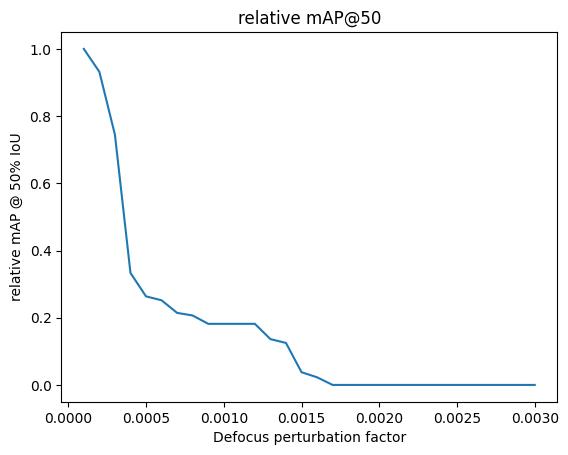
Now we can plot how the metrics (for example, mAP @ IoU=50) vary with perturbation level, keeping in mind this is a relative mAP against the detections in the unperturbed image.
map50_list = [m["map_50"].item() for m in perturbed_metrics]
plt.title("relative mAP@50")
plt.xlabel("Defocus perturbation factor")
plt.ylabel("relative mAP @ 50% IoU")
_ = plt.plot(perturbation_values, map50_list)
Evaluation interpretation
Note that as plotted, the minimum y-axis value is 0.0. The metric shown, mAP@50, is the average precision of detections across all classes when the bounding box IoU is at least 0.5 (for more details, see here.) In general, we observe a perturbation value range between around 0.0 and 0.0002 where the score is about 0.95 or higher, an initial fall off to a mAP@50 of around 0.2 between pertubation values 0.0005 and 0.0012, and then another sharp falloff to an mAP@50 of 0.0. (Note the relative mAP is guaranteed to be 1.0 when the perturbation is 0.0001, i.e. when the image is unchanged, the two detection sets are identical.)
Additional plots
For further insight, we can plot the mAP per class:
#
# Each instance of the metrics object has, potentially, a different set of observed classes.
# Loop through them to accumulate a unified set of classes to ensure consistent plotting across
# all thresholds.
#

unified_classes = set()
for m in perturbed_metrics:
    for class_idx in m["classes"].tolist():
        unified_classes.add(class_idx)

#
# dictionary of class_idx -> list of per-class mAP, or 0 if not present at that threshold
#

class_mAP = {class_idx: list() for class_idx in unified_classes}  # noqa: N816

#
# populate the lists across the perturbation values
#

for m in perturbed_metrics:
    this_perturbation_classes = m["classes"].tolist()
    for class_idx in unified_classes:
        if class_idx in this_perturbation_classes:
            # the index of the class in this individual metric instance
            this_class_idx = this_perturbation_classes.index(class_idx)
            class_mAP[class_idx].append(m["map_per_class"][this_class_idx].item())
        else:
            class_mAP[class_idx].append(0)

#
# plot
#

plt.title("Relative mAP per class")
plt.xlabel("Defocus perturbation factor")
plt.ylabel("relative mAP @ 50% IoU")
for class_idx, class_mAP_list in class_mAP.items():  # noqa: N816
    plt.plot(perturbation_values, class_mAP_list, label=baseline[0].names[class_idx])
plt.legend()
plt.show()
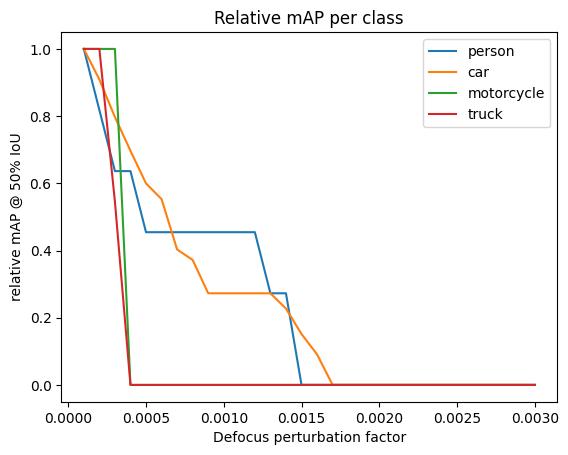
This plot shows several interesting results:
The truck and motorcycle classes are slightly more robust to the initial de-focus set of parameters, but drop off much more quickly than the car and person classes.
There are only two detections for each of the truck and motorcycle classes, causing those class types to be much more sensitive to pertubations than other classes.
One of the 2 truck instances gets incorrectly switched to a car detection early on in the pertubations, so while the detection is correct, the classification is not
Upon visual inspection, the motorcycle beings to blend into the road even to the human eye very quickly when the de-focus parameter starts kicking in.
The car class seems to have the most linear mAP@50 degredation of the classes.
This could be due to the fact that the cars have a wider variety of sizes compared to other classes
Additionally there are many more car instances (15) than non-car (5 persons, 1 motorcycle, 2 trucks) in the unperturbed image.
The person class is capable of holding onto an mAP@50 of ~0.5 longer than other classes.
People, in particular, are distributed throughout the image, but only detected when relatively close and large.
Any conclusions about classification accuracy should be considered in light of these caveats. In particular, the foreground positioning of the detected non-car objects suggests that instead of looking at per-class results, we drill down by bounding box area. Fortunately, the metrics class supports this:
plt.title("relative mAP values per area")
plt.xlabel("Defocus perturbation factor")
plt.ylabel("relative mAP")
for k in ("map", "map_small", "map_medium"):
    plt.plot(perturbation_values, [m[k].item() for m in perturbed_metrics], label=k)
plt.legend()
plt.show()
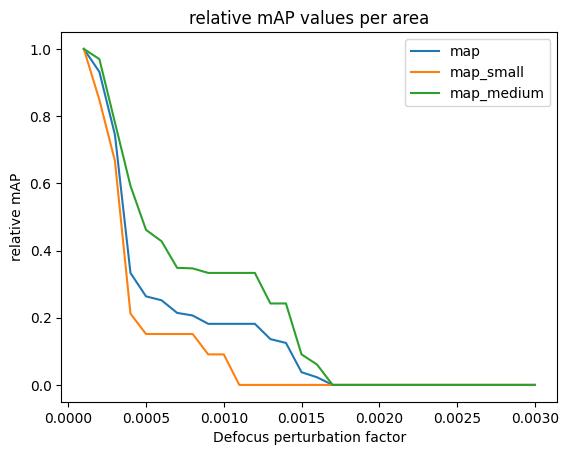
The map line covers all sizes; map_small and map_medium are the mean average precision for objects (smaller than 32^2 pixels, between 32^2 and 96^2 pixels) in area, respectively. (There are no detections in the map_large category.) (Here, the mAP value is averaged over a range of IoU thresholds, between 0.5 and 0.95.) We see that medium objects, regardless of class, are generally much more robust to de-focus perturbations than small ones.