Load Default pyBSM Parameters#
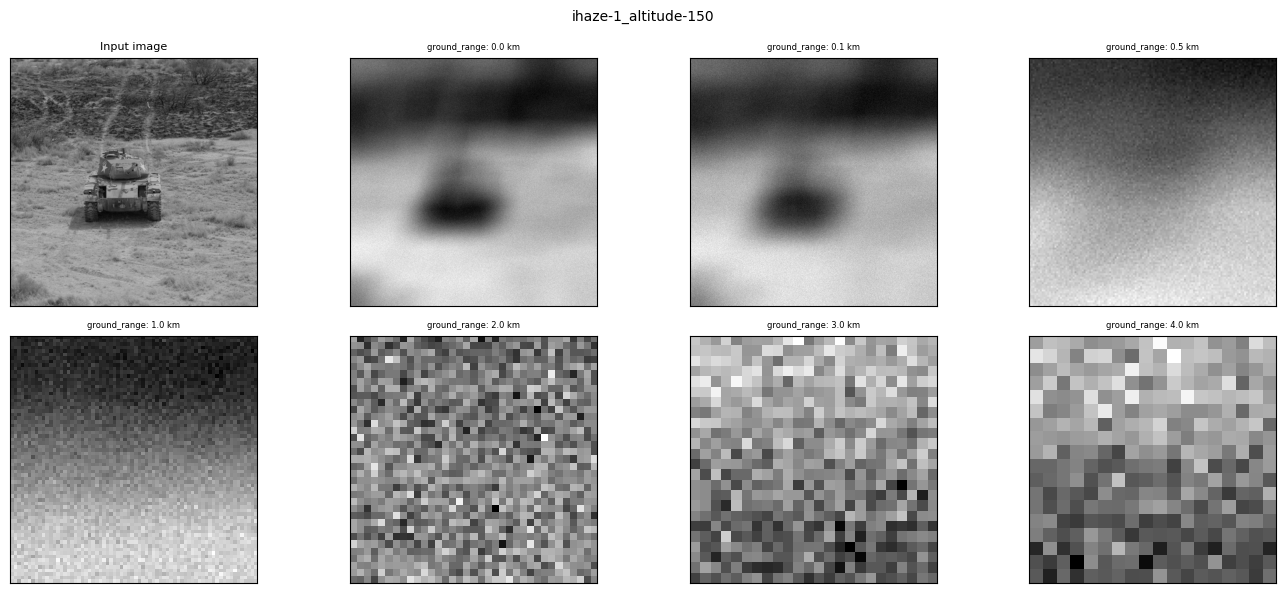
You can use this notebook to run an example image through a series of perturbations as defined by the parameters provided to the pyBSM package. These parameters are loaded in according to what is provided in the default config.
See also
For broader context, pyBSM documentation provides foundational theory on image formation concepts.
To run this notebook in Colab, use the link below:

Set Up the Environment#
Note
We are suppressing warnings within this notebook to reduce visual clutter for demonstration purposes. If any issues arise while executing this notebook, we recommend that this cell is not executed so that any related warnings are shown.
import warnings

warnings.filterwarnings("ignore")
Important
This notebook requires NRTK with the following extra(s):
pybsm: pyBSM sensor simulation library for physics-based optical transfer function perturbations
The next cell will install these extra(s). See Installation for alternatives.
%pip install -qU pip
print("Installing nrtk with required extras...")
%pip install -q "nrtk[pybsm]"
print("Done!")

from nrtk.utils._extras import print_extras_status  # noqa: E402 - intentionally after %pip install

print_extras_status()
Note: you may need to restart the kernel to use updated packages.
Installing nrtk with required extras...
Note: you may need to restart the kernel to use updated packages.
Done!
Detected status of NRTK extras and their dependencies:
[albumentations]
  - nrtk-albumentations       ✗ missing

[diffusion]
  - torch                     ✗ missing
  - diffusers                 ✗ missing
  - accelerate                ✗ missing
  - Pillow                    ✓ 12.2.0
  - transformers              ✗ missing
  - protobuf                  ✗ missing

[graphics]
  - opencv-python             ✗ missing

[headless]
  - opencv-python-headless    ✗ missing

[maite]
  - maite                     ✗ missing

[pillow]
  - Pillow                    ✓ 12.2.0

[pybsm]
  - pybsm                     ✓ 0.14.3

[skimage]
  - scikit-image              ✗ missing

[tools]
  - kwcoco                    ✗ missing
  - Pillow                    ✓ 12.2.0
  - click                     ✓ 8.3.3
  - fastapi                   ✗ missing
  - uvicorn                   ✗ missing
  - pydantic                  ✗ missing
  - pydantic-settings         ✗ missing
  - python-json-logger        ✗ missing

[waterdroplet]
  - scipy                     ✓ 1.17.1
  - numba                     ✓ 0.65.1


For details about installing NRTK extras, please visit:
https://nrtk.readthedocs.io/en/stable/
Note
Colab users: After setting up the environment, you may need to “Restart Runtime” to resolve package version conflicts (see the README for more info).
import os
import urllib.request

import matplotlib.pyplot as plt
import numpy as np
from PIL import Image

from nrtk.impls.perturb_image.optical.otf import load_default_config
Define Sensor and Scenario Parameters via Default Config#
These parameters describe the sensor that was used to capture the original image and scenario we are imaging in.
See also
See pyBSM documentation for general information on the meaning of these parameters and example UAV configuration for more details on how we reached the default UAV configuration.
# dirpath = os.path.dirname(os.path.abspath(__file__))
data_dir = "./data"
os.makedirs(data_dir, exist_ok=True)

url = "https://data.kitware.com/api/v1/item/6596fde89c30d6f4e17c9efc/download"

img_path = os.path.join(data_dir, "M-41 Walker Bulldog (USA) width 319cm height 272cm.tiff")

if not os.path.isfile(img_path):
    _ = urllib.request.urlretrieve(url, img_path)

img_file = "./data/M-41 Walker Bulldog (USA) width 319cm height 272cm.tiff"
image = np.asarray(Image.open(img_file))

###################################################
# Load in the default Blackfly parameters
sensor_and_scenario = load_default_config(preset="blackfly")
####################################################
Use the Perturber Multivariate Factory#
Finally, we use the sensor and scenario objects to create multiple pyBSM perturbers using PerturberMultivariateFactory. We iterate over 7 different ground_range values for the sample image.
from nrtk.impls.perturb_image.optical import PybsmPerturber
from nrtk.impls.perturb_image_factory import PerturberMultivariateFactory

# ground_range = np.arange(0, 101e3, 10e3)
# ground_range = np.arange(0, 10, 2)
ground_range = np.array([0, 0.1e3, 0.5e3, 1e3, 2e3, 3e3, 4e3])
img_gsd = 3.19 / 160.0
perturber_factory = PerturberMultivariateFactory(
    perturber=PybsmPerturber,
    theta_keys=["ground_range"],
    thetas=[ground_range],
    perturber_kwargs=sensor_and_scenario,
)
idx = 1
fig, ax = plt.subplots(2, 4, figsize=(14, 6))
fig.suptitle(
    "ihaze-" + str(sensor_and_scenario["ihaze"]) + "_altitude-" + str(sensor_and_scenario["altitude"]),
    fontsize=10,
)
ax = ax.flatten()  # makes indexing easier
ax[0].set_title("Input image", fontdict={"fontsize": 8})
ax[0].tick_params(left=False, right=False, labelleft=False, labelbottom=False, bottom=False)
ax[0].imshow(image, cmap="gray")
for ii in np.arange(0, ground_range.shape[0]):
    idx = ii + 1

    ax[idx].set_title(
        "ground_range: " + str(ground_range[ii] / 1000) + " km",
        fontdict={"fontsize": 6},
    )
    img_out, *_ = perturber_factory[ii](image=image, img_gsd=img_gsd)
    ax[idx].tick_params(left=False, right=False, labelleft=False, labelbottom=False, bottom=False)
    ax[idx].imshow(img_out, cmap="gray")
plt.tight_layout()
plt.show()